Poshan Tracker Dashboard: Complete Guide to Login, Reports & Beneficiary Data (2026)
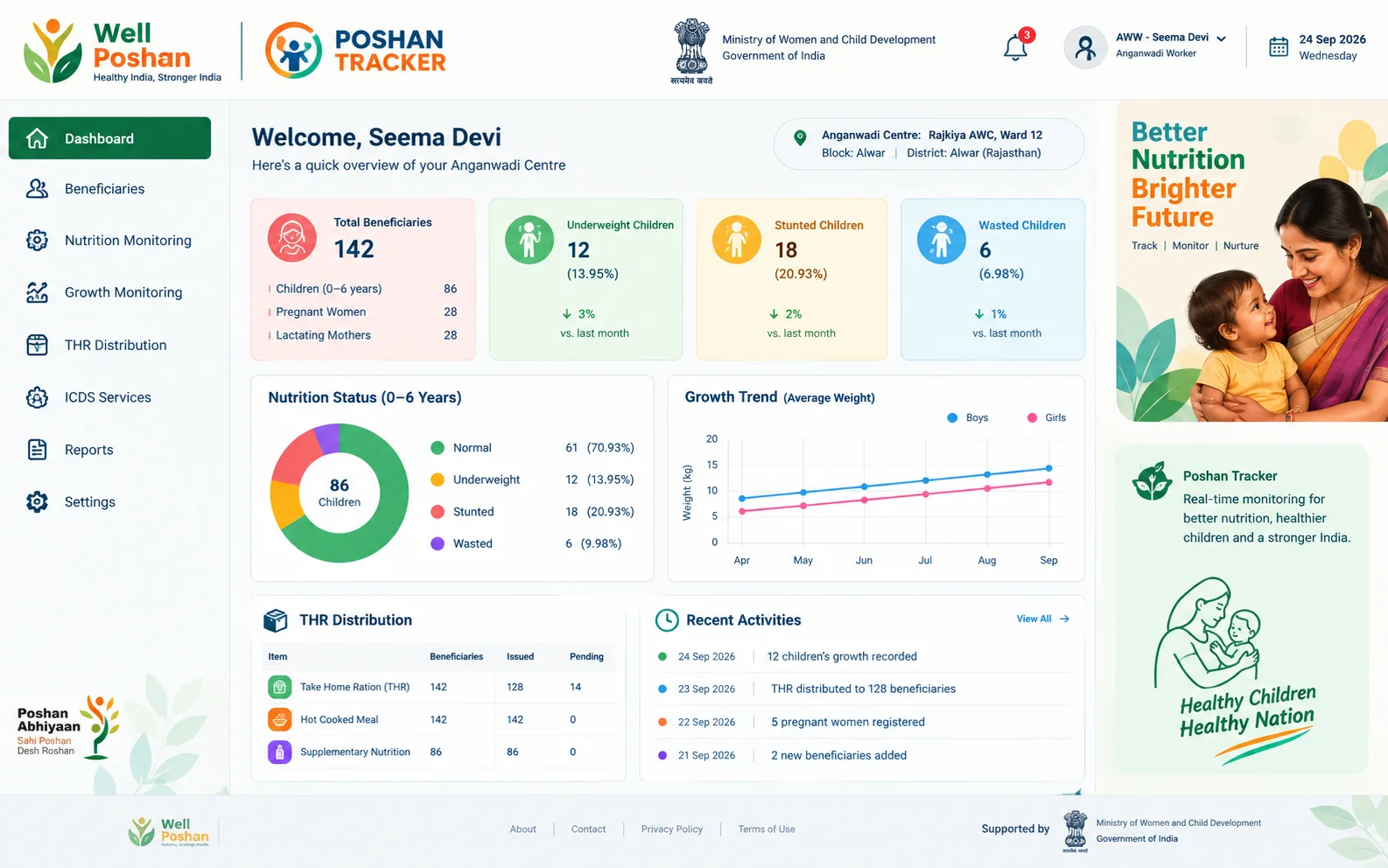
The Poshan Tracker Dashboard is the web-based monitoring backend of India’s POSHAN Abhiyaan (National Nutrition Mission). While the Poshan Tracker app is what Anganwadi Workers (AWWs) use for daily data entry, the dashboard is where supervisors, CDPOs, district officials, state officials, and national administrators view, analyse, and download that data as real-time reports.
As of mid-2026, the platform covers over 8.93 crore beneficiaries across nearly 14 lakh Anganwadi Centres (AWCs), with growth monitoring data recorded for more than 6.3 crore children aged 0–5 — around 94% of all registered children in that age group. Most articles on this topic stop at “it’s a government app.” This one goes into how the dashboard is actually structured, because that structure is what most people searching for it actually need to understand.
What Is the Poshan Tracker Dashboard India Platform?
Poshan Tracker was launched in March 2021 by the Ministry of Women and Child Development (MoWCD) along with the National e-Governance Division (NeGD), under the Saksham Anganwadi and Poshan 2.0 framework. It replaced the 11 manual registers that AWWs previously had to maintain by hand — a shift that removed a major source of delayed, error-prone reporting.
The dashboard sits on top of that data collection. It doesn’t just show numbers — it’s organised into three distinct layers, and understanding this layering is the key to using it correctly:
- Dashboard view – visual summaries (Internal Dashboard, Heat Map, Growth Trends, Beneficiary Dashboard)
- Master List – the underlying records (State, District, Project, Sector, Beneficiary, Users, AWC, Vaccinations, Permissions)
- Reports – exportable data, split into Current Month and Monthly reports
That third layer trips up more users than anything else, and it’s covered in detail below.
Poshan Tracker Dashboard Login: Admin, State & Department Access
There is no single “citizen login” for the Poshan Tracker dashboard — it’s a departmental tool. Login is role-based:
- Admin Poshan Tracker Dashboard Login: National and state-level administrators access the dashboard at admin.poshantracker.in using an email ID, password, and CAPTCHA issued by the department.
- Field-level staff (AWWs, AWHs, Supervisors, CDPOs, DPOs): log in primarily through the Poshan Tracker mobile app using department-issued credentials.
- Dashboard Poshan Tracker Dashboard Login (State/District/Project/Sector): each level has its own restricted view — a District user only sees data for their district, a Sector user only their sector, and so on.
The part most guides skip: you cannot self-register for a Poshan Tracker Dashboard login. Under the Master List → Users section, accounts are created top-down — a National-level admin creates State users, State creates District users, and so on down to the DCPO level. If you don’t have a Poshan Tracker Dashboard Login Password, the fix isn’t a “forgot password” flow on a public form — it’s requesting your credentials from the admin one level above you in this chain (your CDPO, DPO, or state nodal officer).
ICDS Poshan Tracker Dashboard: How It Fits Under Anganwadi Services
Poshan Tracker is the technology backbone specifically for the Integrated Child Development Services (ICDS) scheme, now branded as Anganwadi Services under Mission Poshan 2.0. Every service ICDS is meant to deliver — Supplementary Nutrition (THR and Hot Cooked Meals), immunisation tracking, growth monitoring, pre-school education, and home visits — is what the dashboard’s report categories are built around. If you’re searching “ICDS Poshan Tracker Dashboard,” this is effectively the same system; ICDS is the scheme, Poshan Tracker is the digital monitoring layer for it.
Poshan Tracker Dashboard List: Full Menu Breakdown
This is the part almost no blog covers accurately. Based on the official dashboard training guide, here is the actual menu structure:
Dashboard Section
Master List Section
Reports Section
Current Month Reports:
Monthly Reports:
Poshan Tracker Dashboard Report: Current Month vs Monthly — What’s the Real Difference?
| Report Type | How It Works | Main Use |
|---|---|---|
| Current Month | Updates live and shows what has happened so far in the ongoing month. | Current monitoring and follow-up |
| Monthly | Finalised historical snapshot of the previous month. | Performance incentives, SNP projections and official records |
If your numbers look different between a “current month” screen and a “monthly” report for the same month, this timing difference is almost always why — not a data error.
Poshan Tracker Dashboard Beneficiary & Beneficiary Report New
The Beneficiary Master List shows every registered beneficiary’s type, status, and Aadhaar/mobile verification status. A few details that make this section genuinely “new” compared to earlier versions of the platform:
- Aadhaar and mobile numbers are now masked in the beneficiary master list for privacy.
- Gender field has been added for the Children 0 months–6 years category.
- Beneficiaries can only be deactivated from the CDPO or Supervisor login, and the system requires a stated reason (minimum 5 words) before confirming deactivation.
- Inactive beneficiaries only remain visible in reports for 3 months after deactivation, then drop off.
- Automatic inactivation rules: Pregnant Women become inactive after completing 10 months, miscarriage, abortion, or stillbirth; Lactating Mothers after 6 months; children after turning 6 years; Adolescent Girls after turning 18.
Poshan Tracker Dashboard SAM MAM Report Explained
SAM (Severe Acute Malnutrition) and MAM (Moderate Acute Malnutrition) are wasting classifications based on weight-for-height, calculated automatically by the built-in Poshan Calculator against WHO Growth Standards. A few precise, rarely-published details:
- Referral Register (0–6 months): tracks every active infant with SAM/MAM/SUW/MUW status and whether they were referred to a health facility (NRC, hospital, health centre), admitted, and their treatment outcome — Fully Cured, Partially Recovered, No Change, or Demise.
- Referral Register (above 6 months): SAM children are screened via an appetite test; those with “good appetite,” no medical complication, and no oedema continue on Supplementary Nutrition rather than being referred.
- Anaemia thresholds used in the system: a haemoglobin level below 10.5 g/dL is classified as anaemic for pregnant women, and below 12 g/dL for lactating mothers.
- Low birth weight threshold: any newborn under 2.5 kg.
- The dashboard provides a direct download link for the full list of SAM, MAM, SUW, MUW, stunted, and overweight/obese beneficiaries — including their previous month’s status for comparison.
Poshan Tracker Dashboard Growth Monitoring
Growth Monitoring measures children against WHO standards for stunting (height-for-age), wasting (weight-for-height), and underweight (weight-for-age) status. One technical detail worth knowing if you’re troubleshooting odd results: the system will return “Reference data not found” if a child’s height falls outside 45cm–120cm for the 0-month–5-year category, or outside the specific 45–110cm / 65–120cm bands used for wasting calculations in the 0–2 and 2–5 year sub-groups. If you’re seeing this error, it usually means a height entry is mistyped, not a system fault.
Poshan Tracker Dashboard AWC & AWC User List
The AWC Users master list shows every AWW and AWH (Anganwadi Helper) mapped to a centre, including staff marked as being on “additional charge” (covering more than one centre). Separately, the AWC Performance Incentive formula is one of the most misunderstood parts of the system — many people assume it’s based on an average of tasks completed. It isn’t. An AWW only qualifies for the monthly incentive if both of these are true at once:
60% Home Visits
At least 60% of required home visits completed for Pregnant Women, Lactating Mothers, and children 0–2 years.
80% Growth Monitoring
At least 80% of active children (0–6 years) measured for growth monitoring.
If either condition scores a “0” in the dashboard, the AWW is not eligible that month — even if the other condition is fully met.
Poshan Tracker Dashboard Download
Reports can be downloaded in CSV and PDF format. Hyperlinks (shown as blue clickable numbers within each report) allow drilling down and exporting data at the District, Project, Sector, or AWC level — most reports go all the way down to individual AWC-level detail. Growth Monitoring, Supplementary Nutrition, and Measuring Efficiency data specifically can be downloaded at the Sector level and below.
Poshan Tracker Dashboard Open: Troubleshooting Access Issues
If the dashboard or app won’t open, the most common causes reported are expired login sessions, incorrect department credentials, or the app’s offline sync buffer. The Poshan Tracker app is designed to work offline for up to 3 days, storing entries locally before syncing once internet connectivity returns — so a temporary “not opening” issue for field entry doesn’t necessarily mean lost data.
Poshan Tracker Dashboard Jan Andolan
“Jan Andolan” (people’s movement) is the community mobilisation arm of POSHAN Abhiyaan — Poshan Pakhwada (March) and Poshan Maah (September) campaigns that drive nutrition awareness at the grassroots level. The dashboard’s Jan Andolan-linked data tracks Suposhit Gram Panchayat activities, including Nominated List, Assessment & Review, and Peer Review components, alongside Village Health Sanitation and Nutrition Day (VHSND) and Community Based Events (CBE) participation counts. Since the mission’s inception, over 600 million sensitisation activities have been logged through this channel nationally.
Poshan Tracker Dashboard Admin: What National/State Admins Can Do
Beyond viewing reports, Admin-level dashboard access includes creating new users at six levels (National, State, District, Project, Sector, DCPO), managing AWC master records (including marking centres as Targeted Saksham AWC), adding new vaccines to the vaccination master list, and generating State API tokens for system integrations.
Frequently Asked Questions
What is the Poshan Tracker Dashboard used for?
It’s the reporting and monitoring backend for POSHAN Abhiyaan, used by supervisors and officials to track Anganwadi Centre performance, beneficiary nutrition status, and service delivery in near real-time.
How do I get Poshan Tracker Dashboard login access?
Departmental credentials are issued top-down by an admin one level above you (CDPO, DPO, or state nodal officer) — there’s no public self-registration.
What is the difference between SAM and MAM in the Poshan Tracker Dashboard?
SAM (Severe Acute Malnutrition) and MAM (Moderate Acute Malnutrition) are wasting classifications based on weight-for-height, calculated automatically against WHO growth standards when a child’s measurements are entered.
Can I download Poshan Tracker Dashboard reports?
Yes — nearly every report has hyperlinked data exportable in CSV or PDF format, down to the individual AWC level.
Why is my AWW not eligible for the Poshan Tracker performance incentive?
Both the 60% home-visit target and the 80% growth-monitoring target must be met in the same month — meeting only one disqualifies the AWW for that month’s incentive.