Poshan Abhiyaan Data Entry: The Complete 2026 Login & How-To Guide
Direct answer: Poshan Abhiyaan data entry means logging into one of two government systems — the Jan Andolan Dashboard (for community nutrition-activity reports) or the Poshan Tracker app (for Anganwadi service and child-growth data) — using a department-issued username and password, filling the relevant form, and submitting it so your centre’s work shows up on the national nutrition dashboard.
If that sentence made you go “wait, there are two systems?” — you’re not alone. That’s the single biggest source of confusion around Poshan Abhiyaan Data Entry, and we’re going to untangle it below.
Quick Facts
| What | Details |
|---|---|
| Scheme name | Poshan Abhiyaan / National Nutrition Mission |
| Launched | 8 March 2018, by the Ministry of Women & Child Development |
| Current umbrella | Mission Saksham Anganwadi & Poshan 2.0 |
| Who enters data | Anganwadi Workers (AWWs), Supervisors, CDPOs, and district/state/central nodal officers |
| Two main systems | Jan Andolan Dashboard (web portal) + Poshan Tracker (mobile app) |
| Poshan Tracker launched | 1 March 2021 |
| Jan Andolan Dashboard | poshanabhiyaan.gov.in |
| Login type | Role-based, department-issued credentials — not open public sign-up |
| Peak data-entry season | Rashtriya Poshan Maah, every September; Poshan Pakhwada, every March |
Portals get redesigned and re-branded fairly often, so treat exact button names above as “roughly right” and confirm on the live site if something looks different.
What Poshan Abhiyaan Is Actually Trying to Do
Before the data entry part makes sense, it helps to know why it exists. Poshan Abhiyaan is India’s flagship push to fix childhood stunting, being underweight, anaemia, and low birth weight — with a special focus on children under six, adolescent girls, pregnant women, and new mothers. The idea is simple: you can’t fix what you don’t measure. So every weigh-in, home visit, and awareness camp gets logged, which is exactly what “Poshan Abhiyaan Data Entry” refers to on the ground.
Two Systems, One Confusing Name
Here’s the split that trips up almost everyone searching for Poshan Abhiyaan Data Entry:
| Feature | Jan Andolan Dashboard | Poshan Tracker App |
|---|---|---|
| Format | Website (desktop-friendly) | Mobile app |
| Logs | Community activities — rallies, camps, school sessions, participation counts | Individual beneficiary data — a child’s weight/height, a mother’s checkup, supplement stock |
| Typical user | Ministry nodal officer, block/district coordinator | Anganwadi Worker, Supervisor |
| Busiest during | Poshan Maah (Sept) and Poshan Pakhwada (March) | Runs year-round |
| Public self-signup? | No — credentials are issued top-down | No — role-based login only |
If you were searching for “Poshan Abhiyaan Data Entry App,” you probably want Poshan Tracker. If you were told to “enter Jan Andolan numbers,” that’s the dashboard.
How to Do Poshan Abhiyaan Data Entry on the Jan Andolan Dashboard
This is the classic “Poshan Abhiyaan data entry Login” flow that most guides on the topic walk through:
- Open the official portal — poshanabhiyaan.gov.in. On a phone, switch to “Desktop site” in your browser menu for a cleaner layout.
- Click “Data Entry” in the top-right corner of the homepage.
- Log in with your assigned username, password, and the captcha shown on screen. Usernames typically follow a ministry-plus-location pattern (for example, a district-level Women & Child Development login is built from the department code and the district name).
- Change your default password the first time you sign in, and update your profile details if prompted.
- Open the activity participation form, select the activity type, level, group, and date, enter the number of participants, and attach a photo if the form asks for one.
- Submit and double-check — most dashboards let you view what you just entered so you can catch typos before they go into the official count.
How Data Entry Works on the Poshan Tracker App
Anganwadi Workers and Supervisors handle this side:
- Download Poshan Tracker from the official app store listing only — never a random APK link.
- Sign in with your department-issued login, not a personal email ID.
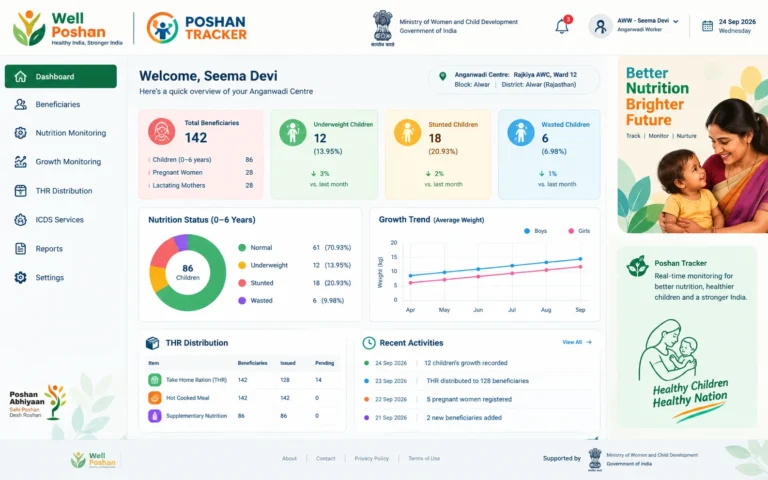
- From your dashboard, add daily service records: growth measurements, home-visit notes, ration/supplement distribution, and beneficiary registration.
- Supervisors and officials above you can see these updates in real time, which is the whole point — it replaces the old paper registers.
Common Poshan Abhiyaan Data Entry Problems (and Realistic Fixes)
| Problem | Likely Cause | What Usually Helps |
|---|---|---|
| Login fails repeatedly | Wrong department vs. district login, or caps-lock on | Re-check the username format with your supervisor; usernames are typically lowercase |
| “Account locked” | Too many wrong password attempts | Contact your block/district IT coordinator — there’s no public “forgot password” self-service for most role-based logins |
| App won’t open after an update | Cache or outdated app version | Clear the app cache, or uninstall and reinstall from the official store listing |
| Entered data not showing on dashboard | Sync delay or wrong reporting period selected | Wait for the sync cycle, then re-check the date/period filter before re-entering anything |
| OTP not arriving (beneficiary-side login, where offered) | Mobile number not linked at the Anganwadi Centre | Ask your AWW to confirm the number on record |
Mini Glossary
- Jan Andolan — literally “people’s movement”; the community-participation side of Poshan Abhiyaan.
- AWW (Anganwadi Worker) — the frontline worker who runs the local Anganwadi Centre and is usually the one doing day-to-day data entry.
- CDPO — Child Development Project Officer, who supervises AWWs across a block.
- Poshan Maah / Poshan Pakhwada — the annual (September) and twice-yearly (March) nutrition-awareness drives where data entry volumes spike hardest.
- Poshan Tracker — the beneficiary-and-service-level mobile app under the mission.
Why This “Boring” Data Entry Actually Matters
It’s easy to see login screens and captcha codes as tedious admin work. But every properly logged entry is what lets district officials spot which villages have rising anaemia rates, which Anganwadi Centres are short on supplements, and which awareness camps are actually landing. Skip the data entry, and the mission is flying blind — which is exactly why the government has pushed so hard to move it off paper registers and onto Poshan Tracker and the Jan Andolan Dashboard.
Conclusion
Poshan Abhiyaan Data Entry isn’t one single thing — it’s two connected systems (the Jan Andolan Dashboard for community activities, and the Poshan Tracker app for beneficiary-level records), both running on role-based logins issued by the department, not open public sign-up. Knowing which system you actually need, and following the login-to-submission steps above, clears up most of the confusion people run into when they search for this topic.
FAQs
1. What is Poshan Abhiyaan Data Entry, in one line?
It’s the process of logging Anganwadi service records or Jan Andolan community-activity numbers into the government’s official nutrition-tracking systems.
2. Where do I do the Poshan Abhiyaan Data Entry Login?
For community/Jan Andolan activities, it’s poshanabhiyaan.gov.in → “Data Entry.” For beneficiary-level records, it’s the Poshan Tracker app with your department login.
3. Can a member of the public create a data-entry account?
No. Both systems use role-based logins issued to Anganwadi Workers, Supervisors, CDPOs, and nodal officers — there’s no open public registration for data-entry access.
4. Poshan Abhiyaan Data Entry kaise kare, if I’ve forgotten my password?
Don’t try to self-reset it from a public page — contact your block or district IT/nodal coordinator, since most department logins don’t offer public “forgot password” recovery.
5. Is there a difference between the Poshan Abhiyaan Data Entry app and the website?
Yes — the app (Poshan Tracker) is for day-to-day Anganwadi and beneficiary records, while the website (Jan Andolan Dashboard) is for community-activity participation numbers.
6. When does Poshan Abhiyaan Data Entry activity peak each year?
Around Rashtriya Poshan Maah every September, and again during Poshan Pakhwada every March, when nationwide awareness drives generate a surge of activity logs.
7. Is downloading a random Poshan Tracker APK safe?
No — stick to the official app store listing. Sideloaded APKs from unfamiliar sites are a common source of login and data problems, and are not sanctioned by the mission.
Thank you For Reading!
Also Read –