PMMVY Nic in Login: 2026 Step-by-Step Guide (Citizen & Staff)
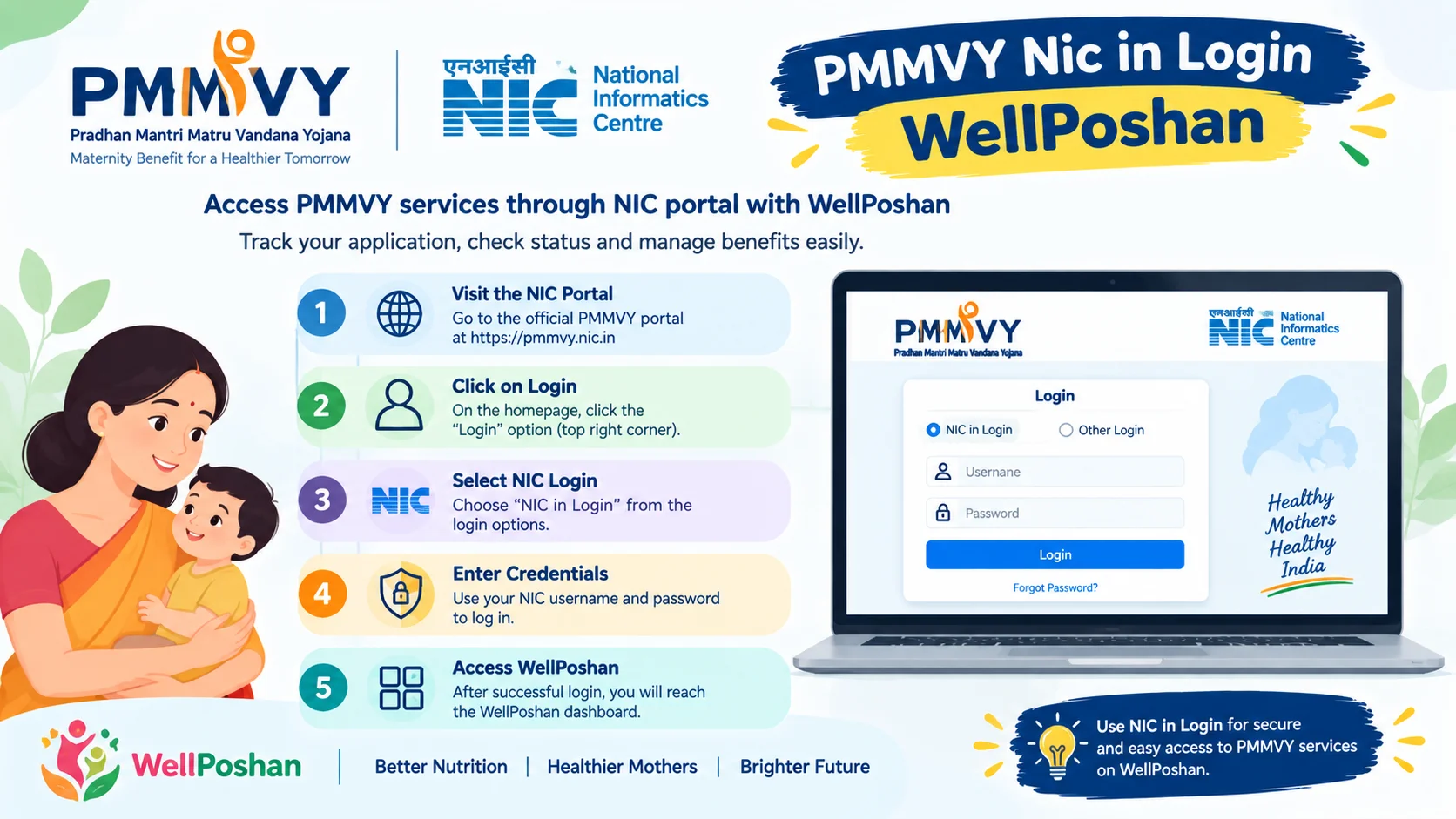
PMMVY NIC in Login now works through the official portal pmmvy.wcd.gov.in. Choose Citizen Login (mobile number + OTP) if you are a beneficiary, or the staff/account login (User ID + password + captcha) if you are an Anganwadi worker, supervisor or officer.
What PMMVY NIC in Login Actually Means in 2026
“PMMVY NIC in Login” is how most people search for the login page of the Pradhan Mantri Matru Vandana Yojana (PMMVY), the government maternity benefit scheme. The old address was pmmvy.nic.in (and cas-pmmvy.nic.in). Current guidance treats pmmvy.wcd.gov.in as the live official portal, with the nic.in addresses described as earlier ones. The Ministry of Women and Child Development’s own FAQ also points applicants to pmmvy.wcd.gov.in.
Important: Some blogs say the old nic.in links still redirect. Others say they no longer work. My advice: don’t gamble. Type the wcd.gov.in address directly, or open it from the ministry’s website.
Terminology Used in This Article
- PMMVY: Pradhan Mantri Matru Vandana Yojana
- PMMVYsoft / CAS: The software (Common Application Software) behind the portal
- Citizen Login: For beneficiaries
- Account/Govt Login: For AWW, ASHA, supervisors, district and state users
PMMVY NIC in Login: Which Login Do You Need?
Most failed logins happen because people pick the wrong door.
| You Are… | Choose | Credentials |
|---|---|---|
| Pregnant woman / new mother | Citizen Login | Mobile number + OTP |
| Anganwadi worker / ASHA | Field functionary login | User ID + password + captcha |
| Supervisor / CDPO / district / state officer | Govt/Account login | Official credentials + captcha |
The PMMVYsoft user manual describes Citizen Login and a separate stakeholder login for field functionaries and supervisors. That split is the whole game.
How to Login PMMVY NIC in Login (7 Steps)
This is the answer-first workflow, copy it as is.
For Beneficiaries (Citizen Login)
- Open pmmvy.wcd.gov.in in your browser (Chrome or Edge).
- Click Login (top right) and select Citizen Login.
- Enter your registered mobile number.
- Enter the OTP sent by SMS.
- Fill or open your application (Aadhaar, bank details, pregnancy registration date).
- Save and note your Registration ID.
- Use that ID later for status checks.
Also Read: PMMVY Login: How to Register, Sign In and Fix Login Problems (2026)
For Staff (Account Login)
- Open the same portal.
- Choose the staff/account login option.
- Enter User ID, password and captcha.
- Click Login and reach your dashboard.
PMMVY NIC in Login User ID and Password: What to Do When It Fails
Citizens log in via OTP, so there is no password to forget. User ID and password apply to staff accounts. One scheme guide notes that invalid credentials usually come from typos, browser autofill errors or lockouts after repeated failed attempts.
Fix Checklist
- Turn off browser autofill and type manually.
- Check Caps Lock (credentials can be case-sensitive).
- Wait 15 to 30 minutes if you were locked out.
- Use Forgot Password.
PMMVY NIC in Login Password Change and Reset
- Forgot password: On the login page, click Forgot Password, enter your User ID or registered mobile, verify the OTP, set a new password.
- Password change (you remember the old one): Log in, open the profile/change password option, enter old and new password, save.
- OTP not arriving? Your registered number is probably outdated. Visit your Anganwadi Centre or health facility to update it.
PMMVY NIC in Login Registration: Beneficiary Registration Online
You can register in two ways: through your Anganwadi worker, or directly online.
An eligible woman can also fill the form directly from the PMMVY portal. The documents you should keep ready:
- Aadhaar card
- Bank account details (Aadhaar-seeded)
- Mother and Child Protection (MCP) card details
- Pregnancy registration/ANC date
- Eligibility proof (ration card, disability certificate, etc., if applicable)
2026 Update: PMMVY NIC in Login Poshan Tracker Link
This is the part most older blogs miss.
PMMVY 2.0 is now tied to the Poshan Tracker. A scheme tracker reports that a Due List system started on 1 July 2025, building lists of likely beneficiaries from Poshan Tracker data. In plain words: if your Anganwadi worker has registered your pregnancy on Poshan Tracker, you may already be on a list for PMMVY.
Poshan Tracker itself is huge. It covers all 28 States and 8 UTs, with over 8.93 crore beneficiaries registered till May 2026. It also replaced the 11 manual registers Anganwadi workers once maintained.
Why this matters to you: Your Poshan Tracker entry and your PMMVY application should carry the same name, Aadhaar and mobile number. Mismatches are the quiet reason many payments stall.
PMMVY NIC in Login Status Check
Here is the quickest way to see where your money is:
- Log in through Citizen Login (or use the beneficiary status section).
- Open your application.
- Check the instalment status and payment date.
- Enter your Registration ID or Aadhaar when asked.
If the status says “pending”, check bank seeding first. If it says “rejected”, read the remark before reapplying.
PMMVY NIC in Login Download: Forms, App and Acknowledgement
- Form 1A, 1B, 1C: Available from the portal and Anganwadi Centres.
- Acknowledgement/registration slip: Download after submission.
- PMMVYsoft app: Meant for field functionaries. The ministry says it is primarily for field functionaries to help with beneficiary enrolment. If you are a beneficiary, you do not need it.
How Much Money Do You Get? (2026 Benefit Table)
The first child gets ₹5,000 in two instalments: ₹3,000 after ANC and ₹2,000 after childbirth and 14 weeks of immunization. A second girl child gets ₹6,000 in one instalment.
| Child | Amount | Instalments | Condition |
|---|---|---|---|
| First child | ₹5,000 | ₹3,000 + ₹2,000 | ANC; birth registration + immunization |
| Second child (girl only) | ₹6,000 | Single | Birth + immunization at 14 weeks |
Eligibility snapshot: Women from SC/ST categories, those with 40% or more disability, BPL ration card holders, and PMJAY beneficiaries qualify. A policy analysis from IMPRI also lists women with net family income not above ₹8 lakh per year.
Deadline to remember: A beneficiary can register until 270 days after childbirth.
PMMVY NIC in Login by State: Rajasthan, Bihar, UP, J&K
The login is national. Rajasthan, Bihar, Uttar Pradesh and Jammu & Kashmir (people search this as “PMMVY NIC in Login JK” or “J&K”) all use the same portal. The difference lies in who verifies your file, namely your state and district officers, and in state top-up schemes.
Examples of State Add-ons
- Rajasthan reportedly raised its state amount from ₹6,500 to ₹10,000 for the first-born child.
- Odisha merged its Mamata scheme with PMMVY in February 2025, with ₹10,000 for a son and ₹12,000 for a daughter.
Check with your district Women & Child Development office for the current state amount before you rely on any figure.
Mini Case Study: Why One Application Stalled (Illustrative Scenario)
This is a composite example, not a real individual.
Before: Meena registers at the Anganwadi centre. Her bank passbook says “Meena Devi”, her Aadhaar says “Meena”. The first instalment stays pending for two months.
What went wrong: The name mismatch plus a bank account that was not Aadhaar-seeded.
After: She gets the account seeded, her Anganwadi worker corrects the name in the system, and the application is re-verified. The pending status clears.
Why this works: Payments flow through Direct Benefit Transfer. The system matches your identity data before releasing money. Think of it like a door lock: the key (your data) must fit exactly.
Common Mistakes with PMMVY NIC in Login
- Using a lookalike or agent website instead of the official portal.
- Choosing Citizen Login when you hold a staff account (or vice versa).
- Keeping an old mobile number registered.
- Entering the bank account without Aadhaar seeding.
- Missing the 270-day window.
- Sharing your OTP with a “helper”. Never do this.
Safety warning: If a site asks for money to “activate” your login, close it. The scheme itself is free.
Where to Get Help
The ministry’s scheme page lists the helpline 1515 (9 am to 6 pm) and the email pmmvy-mwcd@gov.in. The portal also has a grievance module, which was launched in February 2025, where you can file and track a complaint.
Key Terms, With Examples
| Term | Meaning and Example |
|---|---|
| Citizen Login | Beneficiary access. Example: Meena logs in with mobile + OTP. |
| PMMVYsoft MIS | The backend software. Example: Your Anganwadi worker uses it to submit your form. |
| Aadhaar seeding | Linking Aadhaar to your bank account. Example: Without it, a ₹3,000 instalment can fail. |
| ANC (Ante-Natal Check-up) | A pregnancy health visit. Example: ANC triggers the first instalment. |
| MCP Card | Mother and Child Protection card. Example: Carry it to the Anganwadi when registering. |
| Due List | Auto-generated list of likely beneficiaries from Poshan Tracker. Example: Your pregnancy appears there after the AWW registers you. |
| DBT | Direct Benefit Transfer. Example: Money goes straight to your bank account, no middleman. |
| Registration ID | Your tracking number. Example: Use it to check the status. |
FAQs
1. Is PMMVY NIC in Login still working in 2026?
The old nic.in address is treated as the earlier portal, and the official site is now pmmvy.wcd.gov.in. Use that address to be safe.
2. What is the PMMVY NIC in Login User ID and Password for citizens?
Citizens do not need a password. They log in with their mobile number and OTP. User ID and password are for staff accounts.
3. How do I do a PMMVY NIC in Login Status Check?
Log in via Citizen Login, open your application and view instalment status. You can use your Registration ID or Aadhaar number where asked.
4. How do I reset my PMMVY NIC in Login Password?
Click Forgot Password on the staff login page, enter your User ID or registered mobile, verify the OTP and set a new password.
5. Is PMMVY NIC in Login the same in Rajasthan, Bihar, UP and J&K?
Yes, the portal is national. Only the verifying state and district officers, and any state top-up scheme, differ.