Janandolan Poshan Tracker 2026: The Complete Guide to Login, Data Entry and Dashboards
Janandolan Poshan Tracker is the everyday name for two linked government tools: the Jan Andolan Dashboard, where community nutrition activities are reported, and the Poshan Tracker app, where Anganwadi services are recorded. Both are used through department-issued logins.
If you have typed “HTTPS Janandolan Poshan Tracker in” into a search bar and landed on five confusing sites, you’re not alone. The name mashes two systems together, and that confusion causes most of the wrong-portal logins, missing reports and Poshan Maah deadline panics.
This guide untangles it with a copyable workflow and a few mistakes to avoid.
What Is the Janandolan Poshan Tracker?
The term isn’t an official product name. It’s what people call the combination of two things:
- Jan Andolan Dashboard (poshanabhiyaan.gov.in): a web portal for logging community events like rallies, camps and school sessions.
- Poshan Tracker (poshantracker.in): the app and dashboard for individual beneficiary records like a child’s weight and height, a mother’s checkup and ration distribution.
One guide describes the Jan Andolan Dashboard as a website for community activities and the Poshan Tracker as a mobile app for individual beneficiary data. The public Poshan Tracker site also lists a Jan Andolan link in its menu, which is why the two get blended together.
wellposhan
Definitions you’ll need:
- Jan Andolan: Hindi for “people’s movement.” In nutrition, it means turning a government scheme into community action.
- Anganwadi Centre (AWC): the village-level childcare and nutrition centre.
- AWW: Anganwadi Worker, the person who enters most of the data.
- THR: Take Home Ration.
- CDPO: Child Development Project Officer, who supervises the block.
Why the Janandolan Poshan Tracker Matters in 2026
Here’s the “why” behind all the data entry: what isn’t recorded can’t be funded, fixed or found.
India’s National Family Health Survey (NFHS-5, 2019-21) put stunting in under-fives at about 35.5%, wasting at about 19.3% and underweight at about 32.1%. Numbers like these only improve if someone measures children regularly and acts on the results. That’s the tracker’s job.
The 2026 numbers:
- The Poshan Tracker covers all 28 States and 8 UTs and had registered over 8.93 crore beneficiaries as of May 2026. (Drishti IAS)
- drishtiias
- As of May 2026 it had monitored the growth of over 6.3 crore children, nearly 94% of registered beneficiaries. (Drishti IAS)
- drishtiias
- Before the tracker, Anganwadi workers kept eleven separate paper registers by hand. (RJ Associates)
- rjassociatesmedia
- The 9th Rashtriya Poshan Maah was launched at Varanasi on 9 September 2026, and over 150 crore Jan Andolan activities have been conducted through Poshan Maah, Poshan Pakhwada and similar initiatives. (IANS)
- thehawk
My take: the 150 crore figure is impressive, but it’s also a warning. A huge activity count only means something if each activity is logged accurately. The Jan Andolan Dashboard is the government’s evidence trail, so sloppy entries turn a movement into noise.
Janandolan Poshan Tracker vs Poshan Tracker App: Know Which Is Which
| Feature | Jan Andolan Dashboard | Poshan Tracker App |
|---|---|---|
| Format | Website | Mobile app plus web dashboards |
| What you log | Events, camps, rallies, participation counts | Child growth, mother checkups, THR, attendance |
| Official domain | poshanabhiyaan.gov.in | poshantracker.in |
| Typical user | Nodal officers, supervisors, CDPOs | AWWs, supervisors |
| Peak season | Rashtriya Poshan Maah (September) | Year-round, monthly cycles |
Both use role-based, department-issued credentials, not open public sign-up. If a site offers to “register you” for a fee, walk away.
wellposhan
How to Log In to the Janandolan Poshan Tracker (5 Steps)
Screens change between updates, so verify each step on the live portal.
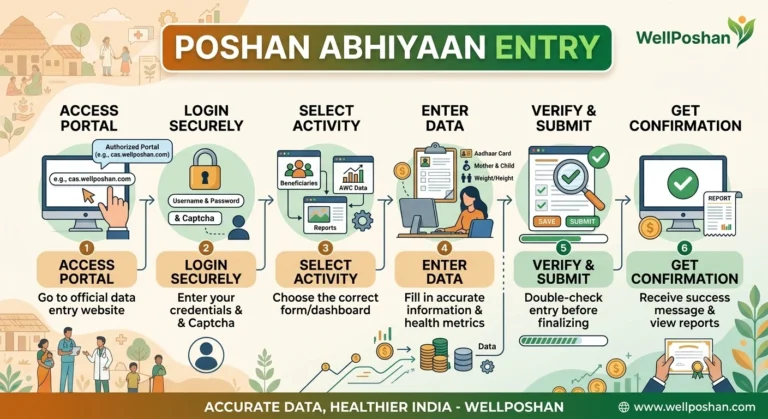
- Confirm your role. AWW, supervisor, CDPO, district or state nodal officer. Your role decides what you see.
- Get your credentials from your department. Your supervisor or district cell issues them.
- Open the correct official portal. Use poshanabhiyaan.gov.in for Jan Andolan reports and poshantracker.in for the tracker. Type the address yourself rather than trusting an ad.
- Enter your username or email, password and captcha. Third-party guides describe a login of email ID, password and captcha, which is typical for department logins.
- Land on your dashboard and file your report. Check the confirmation, since a saved draft isn’t a submitted report.
Pro tip: search engines reward the “HTTPS Janandolan Poshan Tracker in” style of query, but lookalike domains ride the same searches. Check for the padlock and the .gov.in or .in domain before typing a password.
The JAN Method: A Workflow You Can Copy
Most errors come from doing the right thing in the wrong place or at the wrong time. This is the three-part checklist I’d give any team.
J: Judge the system. Ask whether you’re reporting a community event or an individual beneficiary record. Events go to the Jan Andolan Dashboard and beneficiary data goes to the Poshan Tracker.
A: Authenticate correctly. Use your own credentials. Sharing a login is the fastest route to lost data and audit trouble.
N: Notch it in the same day. Enter the day’s work before you leave the centre or event. Memory decays faster than mobile data.
The Completeness Formula
I suggest aiming for 95% or higher for your own tracking. That’s a practical internal target, not an official benchmark. If you sit below 80% during Poshan Maah, you’re probably batching uploads too late.
Before and After: A Composite Example
This is an illustrative scenario, not a real centre’s record.
Before: A block runs 40 Poshan Maah events. Supervisors collect photos on WhatsApp and upload them in one big batch on the final Friday. The portal slows down and three villages’ entries are duplicated. Eight events are missed because nobody remembers the counts.
After: The block adopts the JAN Method. Each supervisor uploads events the same evening, and a Monday check compares the register with the dashboard.
| Metric | Before | After |
|---|---|---|
| Upload timing | Last-day batch | Same-day entry |
| Duplicates | Frequent | Caught in weekly check |
| Missing events | About 20% | Near zero |
| Stress level | Extreme | Manageable |
The change is procedural. Nothing in the software is different.
Poshan Tracker Features Worth Knowing in 2026
- Aadhaar-based verification and facial recognition. The platform uses a Facial Recognition System and Aadhaar-based tracking to prevent leakages and eliminate ghost entries.
- indianweb2
- Biometric registration. From 1 August 2025, Anganwadi Workers register beneficiaries using biometric authentication on the app.
- jabasu
- Scale. The app monitors over 14 lakh Anganwadi Centres and nearly nine crore beneficiaries.
- newsonair
- Public dashboards and helpdesk. The official site lists a public dashboard, insights dashboards, beneficiary redressal and a state helpdesk for raising tickets about app issues.
Why this works: identity checks make each record trustworthy, which makes dashboards useful for real decisions.
Common Mistakes With the Janandolan Poshan Tracker
- Logging events in the wrong system. Community events don’t belong in beneficiary records.
- Using unofficial domains. Only trust official .gov.in and .in portals.
- Waiting until the last week of Poshan Maah. Traffic peaks in September, which is when things time out.
- Skipping the confirmation screen. Drafts don’t count.
- Sharing passwords. It blurs accountability and can lock accounts.
- Uploading unclear photos. Blurry evidence gets questioned. Capture clear, well-lit images with the banner visible.
- Ignoring the helpdesk. Raise a ticket the same day instead of retrying for a week.
Quick Reference Checklist
- ✓ Right portal for the task
- ✓ Own credentials, no sharing
- ✓ Same-day upload
- ✓ Counts match the paper register
- ✓ Clear photos attached
- ✓ Confirmation screen saved
- ✓ Weekly completeness check done
Conclusion
The Janandolan Poshan Tracker only looks complicated because one nickname covers two systems. Once you separate community reporting (Jan Andolan Dashboard) from beneficiary records (Poshan Tracker), the rest is discipline: the right portal, your own login and same-day entry. Do that and your centre’s work shows up in the numbers the mission runs on.
Key Takeaways
- The Janandolan Poshan Tracker is two tools, not one: the Jan Andolan Dashboard for events and the Poshan Tracker for beneficiaries.
- Access is role-based and department-issued. There’s no public registration.
- The Poshan Tracker registered 8.93 crore beneficiaries across all 28 States and 8 UTs as of May 2026.
- sarkaritel
- The JAN Method (Judge, Authenticate, Notch it in) prevents most data errors.
- Same-day entry beats batch uploads, especially in September.
Summary
This guide explained what the Janandolan Poshan Tracker is, how the Jan Andolan Dashboard differs from the Poshan Tracker app, and how to log in through official portals. It also covered the 2026 statistics, the JAN Method, a completeness formula, a before-and-after example, common mistakes and a checklist.
FAQs
1. What is the Janandolan Poshan Tracker?
It’s the common name for the Jan Andolan Dashboard (community activity reporting) and the Poshan Tracker app (Anganwadi beneficiary records), both used under POSHAN Abhiyaan.
2. Can anyone create an account on the Janandolan Poshan Tracker?
No. Logins are issued through the department to Anganwadi and government staff. Public users can view the public dashboards instead.
3. Is “HTTPS Janandolan Poshan Tracker in” an official website?
It’s a search phrase, not a website. The official portals are poshanabhiyaan.gov.in and poshantracker.in, so check for HTTPS and the correct domain.
4. When is the Janandolan Poshan Tracker busiest?
September, during Rashtriya Poshan Maah. The 9th edition began on 9 September 2026, so enter data daily to avoid slowdowns.
5. What should I do if my Janandolan Poshan Tracker login fails?
Recheck your credentials and captcha, confirm you’re on the official domain, then raise a ticket through the state helpdesk listed on the Poshan Tracker site.